Say sorry with a Spotify playlist
When words alone are not enough, let songs say it. Write your apology and get a playlist where the song titles spell it out.
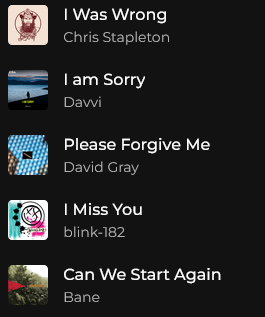
Free to try: messages up to 30 characters cost nothing.
200+ people have already tried it 400+ playlists created
An apology that shows you made an effort
Saying sorry is hard, and a short text can feel too easy. Building your apology out of real songs shows you took the time, and it is much harder to ignore.
It does not replace a real conversation, but it is a gentle way to open one. Write what you want to say and Messagify finds a song for each word or phrase.
How does it work?
Three simple steps to turn your words into music
Sign in with Spotify
Connect your Spotify account. We only ask to read your basic profile and to create playlists for you, and we never see your password.
Write your message
Type a short message to someone, it can be sweet, funny, deep, or poetic, and we’ll turn it into a unique playlist they can listen to.
Enjoy your playlist!
Discover the songs that match your message, preview them, and save the playlist to your Spotify account.
Free to try: messages up to 30 characters cost nothing.
More ideas for your message
Every occasion has its own playlist
Frequently asked questions
Is it a good way to apologise?
It is personal and it shows effort, so it can help you break the ice. It works best as the first step before talking, not as a replacement for it.
Is it free to try?
Yes. Messages up to 30 characters cost nothing, so you can test a short apology before making a longer one.
Is it free?
You can try it for free: messages up to 30 characters cost nothing. Longer messages use a credit when you save the playlist, and credit packs are available inside the app.
What if a word has no song?
Messagify looks for a song whose title matches each word or phrase. If there is none, that word is shown as "not found" so you can rewrite it before saving.
Why do I need to sign in with Spotify?
We use your account to search for songs and to create the playlist in your library. We can read your basic profile (name and email) and create playlists, and we never see your password.
Can the other person listen to it?
Yes. The playlist is created in your Spotify account, and you can share it with anyone from Spotify. They only need a Spotify account to listen.
